

You probably know already that applying to college is complicated. The Common App questions alone are a lot to work through. Plus, you’ll write at least one 650-word essay, but probably more if you’re applying to competitive colleges. You’ll also need recommendation letters from teachers and your high school counselor. The whole process is time-consuming, overwhelming, and stressful.
Here’s the thing: you need to fill out your college application correctly. Mistakes can cost you in terms of admissions chances and merit scholarships. The Common Application, also known as the Common App, lets you apply to up to 900 colleges with one application. So getting it right matters.
Good news? This guide has been updated with fresh screenshots and answers to all the Common App questions you’ll encounter in the new interface.
Below, you’ll get a step-by-step walkthrough of each section. You’ll learn what each question asks, why the Common App includes it, and how to answer accurately for maximum admissions and merit aid consideration.
This guide was created for informational purposes only. If you have specific questions about your application, consult the official Common App website to complete and submit your application.
The Common App Questions:
First-Year Applicant

Table of Contents
Create Your Account
To get started, visit commonapp.org to create your account. You’ll input basic demographic information and choose a username and password. Write these down and keep them somewhere safe. Seriously. You’ll be logging in multiple times over several months. Pro tip: Download My College Tracker, a free excel spreadsheet that helps you organize deadline dates, required materials, and login credentials for all your applications in one place.
Dashboard
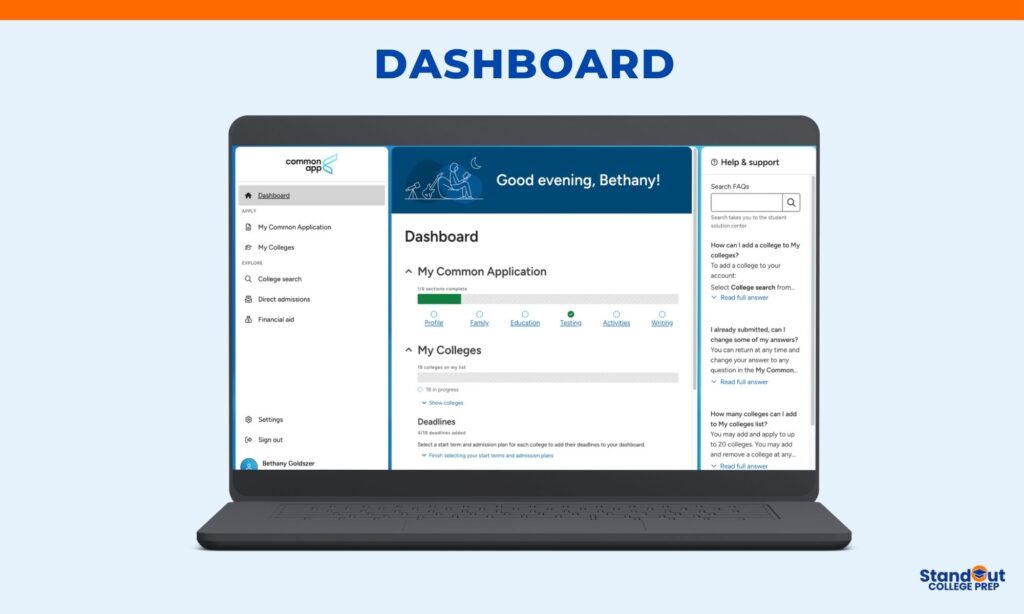
The Dashboard is your home base. This is where you’ll see everything at a glance: your application progress, the colleges on your list, and upcoming deadlines.
In the new redesigned Common App, your Dashboard shows two main sections:
My Common Application
This tracks your progress through the main application sections: Profile, Family, Education, Testing, Activities, and Writing. You’ll see a checkmark when each section is complete. These are the Common App questions that stay the same across all your schools.
My Colleges
Here’s where you’ll see all the colleges you added from the College Search tab. The dashboard shows how many schools are on your list and tracks your progress for each one.
For each college, you’ll need to select a start term and admission plan (Early Action, Early Decision, Regular Decision, etc.). Once you do, the specific deadline will populate in your Deadlines section. You can add up to 20 colleges total.
The dashboard will also track school-specific requirements like writing supplements. Not all colleges require supplemental essays, but some do. And here’s the catch: colleges can add essay requirements during the application cycle, sometimes well into fall semester.
A word of caution: Check your dashboard regularly. The last thing you want is to hit submit at 11:59 PM on deadline night and discover a 500-word supplemental essay you didn’t know existed.
After you submit each application, you’ll be able to track when colleges download your materials and view your submitted application.
College Search
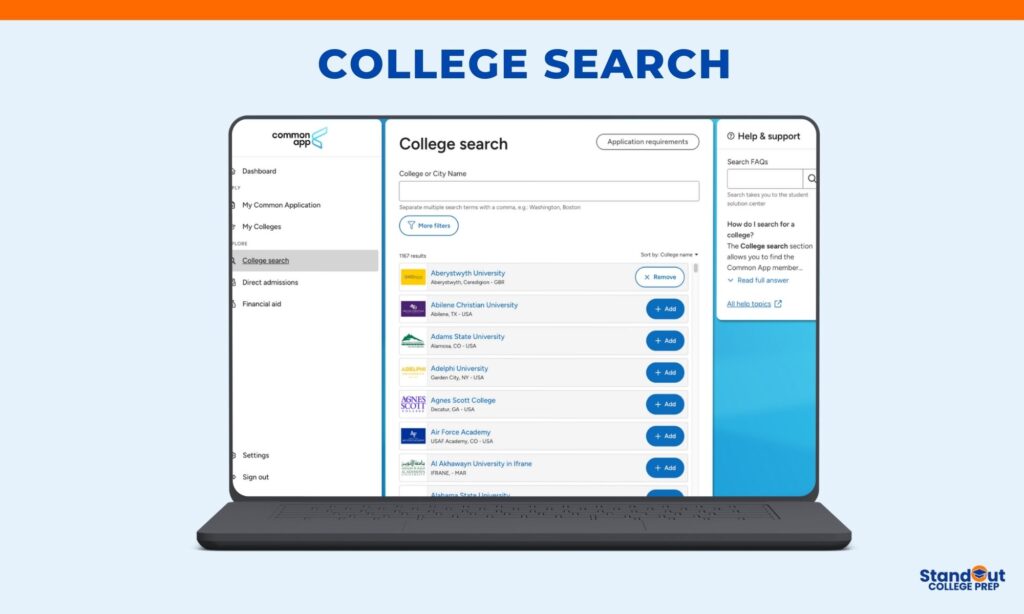
Start here. The College Search tab is where you can look up colleges that you want to add to your “to apply” list. After you look up and add these colleges, they will be visible in the Dashboard and My Colleges tabs.
You can search for the college by name or city.
This photo was taken by a screenshot from commonapp.org.
Also, you can apply more filters and search by:
- Country, drop-down menu for you to select your country.
- State, drop-down menu for you to choose your state.
- Distance from your zip code.
- Term, fall 2024, spring 2024, or another start date in 2024.
- Deadline, where you can enter a specific date.
The filter feature can help if you want colleges with specific application features on your list. This feature makes it easy to find schools that meet the criteria you are looking for, such as:
- Application fee, if there is no fee for domestic applicants or no fee for international applicants.
- Writing requirements, if the Common App general essay is required or additional supplemental essays.
- Standardized test policy if you’re looking for colleges that range in their consideration of scores (e.g., SAT and ACT scores).
- Letters of recommendations, if they are required or not required.
Make sure you confirm that you’ve selected the right college by checking its address and website information. For example, there would be nothing worse than applying to St. John’s University when you meant to apply to St. John’s College.
You can also look up the application requirements for all Common App colleges by visiting this link.
My Common Application: Profile
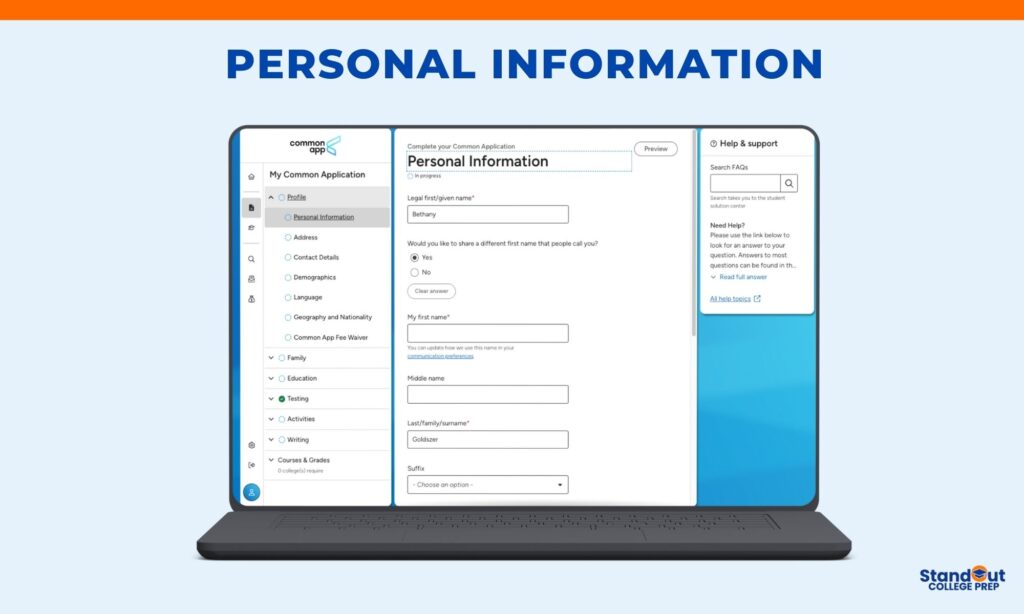
The Profile section contains the first set of Common App questions you’ll answer. These questions collect your basic demographic and contact information. This is straightforward stuff, but accuracy matters. Colleges use this data for everything from mailing you acceptance letters to tracking diversity statistics.
Personal Information
The Common App questions in this section ask for your legal name as it appears on official documents. If you go by a different name (nickname, preferred name, etc.), you can indicate that by selecting “Share different name.”
Enter your birthdate exactly as it appears on your birth certificate or passport.
Contact Details
You’ll answer questions on the Common App about your email and phone number. Provide an email address you check regularly. This is how colleges will communicate with you about your application status, financial aid, and admission decisions. Use a professional email address, not something like partygirl2025@email.com.
Add your phone number and indicate whether it’s a home, cell, or work number. Make sure your voicemail is set up and sounds professional.
Permanent Address
This is your current home address where you live most of the time. If your parents are divorced or separated and you split time between two homes, use the address where you receive mail and spend the majority of your time.
Alternate Address
Only fill this out if you have a secondary address where you regularly stay (like a second parent’s home or a boarding school address during the academic year). Most students leave this blank.
Demographics
These Common App questions are optional but help colleges track diversity in their applicant pools and enrolled students.
- Sex: Select male or female as it appears on your official documents.
- Military status: Indicate if you’re currently serving, a veteran, or a dependent of active duty military. This can affect admissions considerations and scholarship opportunities at some schools.
- Hispanic or Latino/a/x: Answer yes or no. If yes, you’ll select your specific background from a list of options.
- Race: You can select one or more racial categories that apply to you. This is optional. For American Indian or Alaska Native, you’ll indicate if you’re enrolled in a tribe.
Language
Select your first language. This is the language you learned first or speak most fluently at home.
Geography and Nationality
The questions on the Common App about citizenship are critical for international students.
Citizenship status: Indicate whether you’re a U.S. citizen, permanent resident, refugee, or citizen of another country.
If you’re an international student, you’ll provide information about your citizenship and current or intended U.S. visa status. Be specific here because it affects your application category and financial aid eligibility.
Common App Fee Waiver
If you qualify for a fee waiver based on financial need, you can request one here. Your school counselor will verify your eligibility. Fee waivers cover application fees at participating colleges, which can save you hundreds of dollars across multiple applications.
How to answer these Common App questions:
Be accurate. Double-check spelling, especially your legal name and address. Errors here can cause problems with financial aid processing and official transcripts.
Be honest. Don’t misrepresent your demographic information. Colleges verify this data.
Use your school records. When in doubt about how to answer demographic questions, check how your high school has you listed in their system.
My Common Application: Family
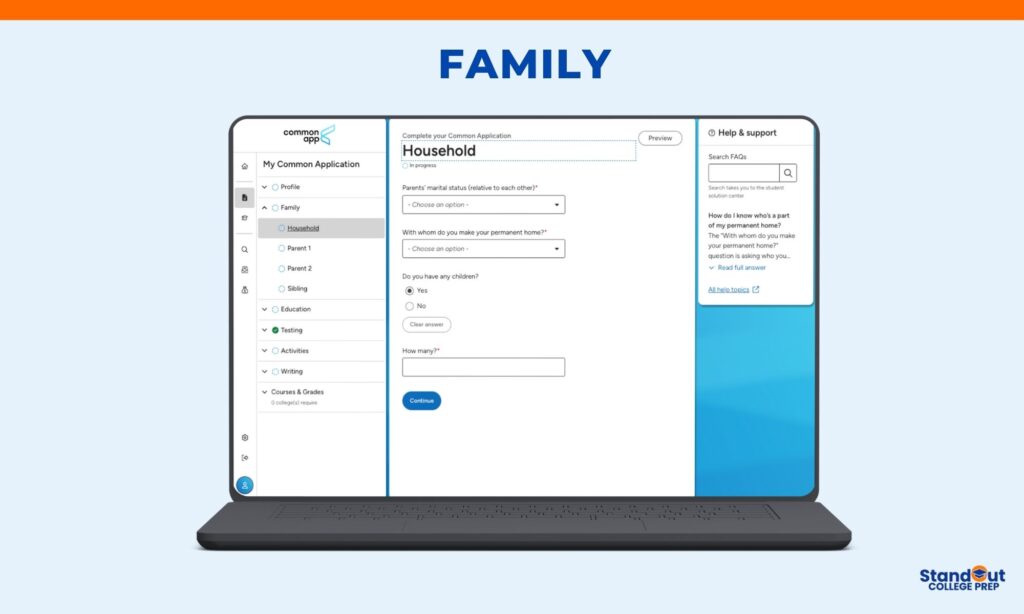
My Common Application: Family
The Family section includes Common App questions about your household, parents, and siblings. Colleges use this information to understand your family background and circumstances, which provides context for your academic journey.
Before you start: Gather information about your parent(s) or legal guardian(s). You’ll need details like where they work, their job titles, where they went to college (if applicable), and their contact information.
Important: Keep Parent 1 and Parent 2 consistent across ALL your college-related applications. This includes the FAFSA, CSS Profile, Coalition Application, and any other college applications. Switching who is Parent 1 and Parent 2 between forms creates confusion and can delay financial aid processing.
Household
The questions on the Common App about your household start with your parents’ marital status. You’ll select from options like married, divorced, separated, never married, or widowed.
If divorced or separated, you’ll enter the year.
Next, you’ll indicate with whom you make your permanent home. This is the person (or people) you live with most of the time. You can select both parents, one parent, a legal guardian, indicate you’re a ward of the state, or select “Other.”
If you select Legal Guardian, a new section will appear for their information. Do NOT add your legal guardian in the Parent 1 or Parent 2 sections. Also, make sure they are a court-appointed guardian. If they’re just a relative or family friend you’re living with, you may still need to enter your birth parents’ information. Check with your guidance counselor if you’re unsure.
If you select Other, you’ll need to explain your living situation in a text box.
You can also add information about stepparents and any children you may have. These fields are optional.
Parents
For each parent, you’ll answer Common App questions about:
- Demographics: Name, relationship to you (mother, father, other parent), whether they’re living or deceased
- Contact information: Email, phone number, address (if different from yours)
- Education: Highest level of education completed (high school, some college, bachelor’s degree, graduate degree, etc.) and where they attended college
- Employment: Current employer, occupation, job title
Options if you have limited information:
You can select “Limited information about this parent” if you don’t have complete details. This might apply if you’re estranged from a parent or they’re not involved in your life.
You can also select “No second parent” or “Deceased” if applicable.
Siblings
The Common App questions about siblings ask for basic information about your brothers and sisters:
- Name and age
- Whether they’re currently in college, graduated from college, or haven’t attended college
- Which college they attend or attended (if applicable)
This information helps colleges understand your family’s college experience and can sometimes factor into legacy admissions or sibling legacy considerations at certain schools.
How to answer these questions:
Be accurate and consistent. Use the same parent information across all applications and financial aid forms.
Don’t overthink education levels. If your parent attended some college but didn’t graduate, select “Some college.” If they have a professional degree like a JD or MD, that counts as graduate school.
It’s okay to have limited information. If you genuinely don’t know details about a parent, the Common App provides options for that. Don’t guess or make up information.
Ask for help if your situation is complicated. Blended families, legal guardianships, foster care, and other non-traditional situations can be confusing. Your school counselor can help you answer these questions correctly.
My Common Application: Education
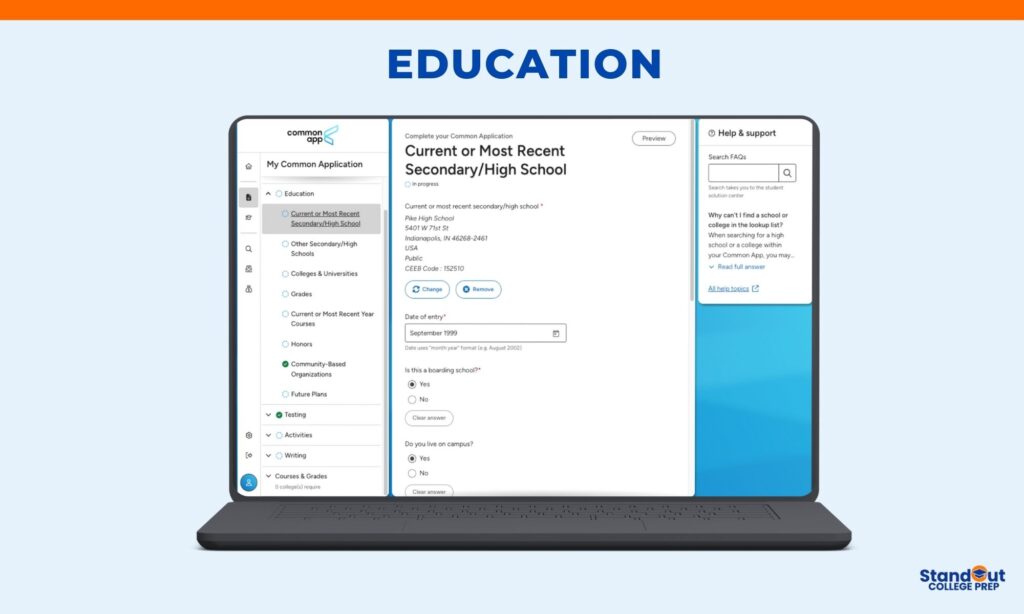
The Education section contains Common App questions about your high school, any college courses you’ve taken, your grades, and your academic plans. This is where you’ll provide the academic foundation of your application.
Current or Most Recent Secondary School
You’ll search for your high school by name or CEEB code. The Common App will auto-populate your school’s address and details once you select it.
If you’re homeschooled, you’ll select that option and provide information about your homeschool program.
If you’ve attended multiple high schools, you’ll list your current or most recent school here and add previous schools in a separate section.
Boarding School
If you attend a boarding school, indicate whether you live at school, live nearby, or commute. This helps colleges understand your living situation during high school.
Progression
The questions on the Common App about your academic progression ask if you graduated early, on time, or will graduate late.
You’ll also enter your graduation date (or expected graduation date if you’re still in school).
If you took a gap year or had an interruption in your education, you can explain that in the Additional Information section later in the application.
Colleges & Universities
If you’ve taken college courses while in high school (dual enrollment, community college classes, summer programs), you’ll list those institutions here.
For each college, you’ll provide the school name, location, dates of attendance, and degree earned (if any). Most high school students will list “No degree” since they’re taking individual courses, not completing a degree program.
This section is important for students who have taken college-level coursework. It shows academic rigor and helps colleges understand your transcript better.
Grades
You’ll report your GPA and class rank in this section.
GPA: Enter your cumulative GPA and indicate the scale (4.0, 5.0, 100-point, etc.). Also specify if it’s weighted or unweighted. Use exactly what appears on your official transcript. Don’t recalculate or estimate.
Class Rank: If your school ranks students, enter your exact rank and the total number of students in your class (Example: 15 of 350). If your school doesn’t rank, select “None” or “School does not rank.” Many schools have moved away from ranking, so this is common.
Current or Most Recent Year Courses
You’ll list the courses you’re taking (or took) during your senior year. Include the full year schedule, not just fall semester.
For each course, indicate if it’s full year or single semester, and the level (AP, IB, Honors, College/University, Regular).
This gives colleges a clear picture of your senior year course load and academic rigor.
Honors
This is where you’ll list academic honors and awards you’ve received. These can be school-based (Honor Roll, National Honor Society), regional (County Science Fair winner), national (National Merit Semifinalist), or international.
You can list up to five honors. For each, you’ll provide the honor name, level of recognition (school, state, national, international), and grade level when you received it.
Choose your most impressive and meaningful honors. If you have more than five, prioritize higher-level recognition and recent achievements.
Community-Based Organizations
These Common App questions ask about college access programs you’ve participated in, like Upward Bound, QuestBridge, Posse, or local college prep programs.
If you participated in a structured program that helped you prepare for college, list it here. Include the organization name and years of participation.
This helps colleges understand what support and resources you’ve had access to during high school.
Future Plans
You’ll select your intended career path or field of interest from a dropdown menu. Options include categories like Business, Engineering, Health Professions, Law, Education, or Undecided.
Don’t stress about this. You’re not locked into this choice, and colleges know students change their minds. Just select what genuinely interests you right now.
How to answer these Education questions:
Use your official transcript. Don’t guess your GPA or courses. Pull out your transcript and enter information exactly as it appears.
Be consistent with college coursework. If you listed dual enrollment courses here, make sure those grades also appear on transcripts you send to colleges.
Don’t inflate or deflate your achievements. Report your actual GPA, actual rank, actual honors. Admissions officers will see your official transcript and will notice discrepancies.
Ask your counselor for help. If you’re unsure about your GPA scale, class rank, or how to categorize a course, your school counselor has this information and can guide you.
My Common Application: Testing
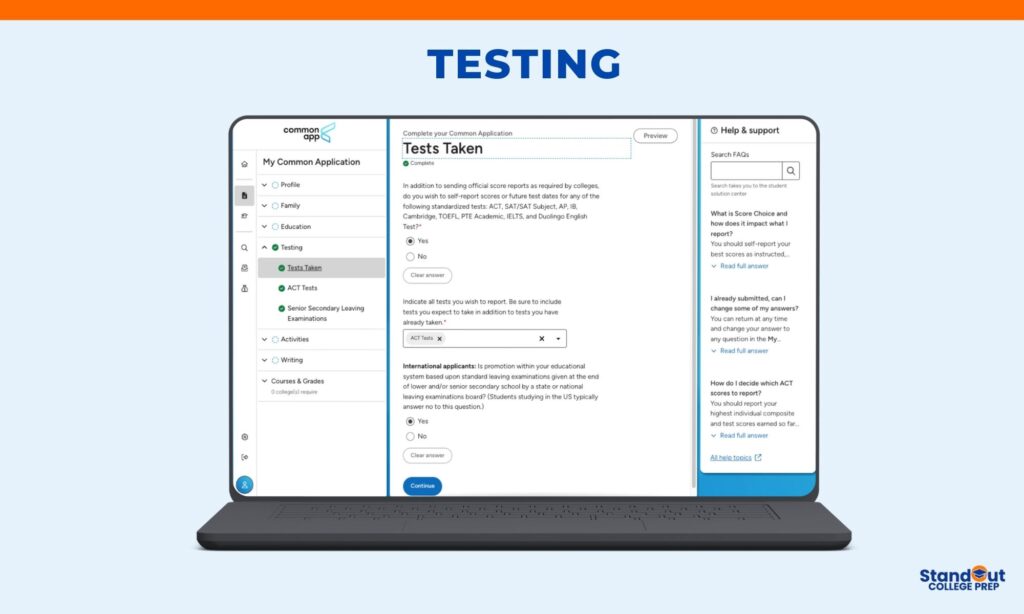
The Testing section covers Common App questions about standardized test scores. This is where you’ll self-report scores you want colleges to consider as part of your application.
Do You Want to Self-Report Scores?
The first question asks if you wish to self-report scores for any standardized tests. You’ll answer yes or no.
If you answer yes, you can report scores from: ACT, SAT, SAT Subject Tests (discontinued but some students still have scores), AP, IB, Cambridge, TOEFL, PTE Academic, IELTS, and Duolingo English Test.
If you answer no, you’re choosing not to report any test scores on your Common App. You can still send official score reports directly from testing agencies if required by specific colleges.
Which Tests to Report
After you indicate yes, you’ll select which tests you want to report. You can choose multiple test types.
For each test, you’ll enter test dates and scores. You can also list future test dates if you’re planning to take exams after you submit your application.
Test-Optional Policies
Here’s what you need to know: most colleges now have test-optional policies. This means submitting SAT or ACT scores is not required for admission consideration.
Before you decide whether to report scores, check each college’s testing policy. Some are test-optional, some are test-blind (don’t consider scores at all), and some still require scores.
If your scores are at or above a college’s middle 50% range, reporting them can strengthen your application. If your scores are below that range, you might be better off applying test-optional. Read this article to weigh the pros and cons of applying test-optional.
For International Applicants
The Common App questions for international students include: “Is promotion within your educational system based upon standard leaving examinations given at the end of lower and/or senior secondary school by a state or national leaving examinations board?”
If you’re studying in the US, you’ll typically answer no to this question.
If you answer yes, additional sections will appear for you to report your leaving examination scores (like A-Levels, GCSE, or other national exams depending on your country).
English Language Proficiency
International students whose first language is not English will also report TOEFL, IELTS, PTE Academic, or Duolingo English Test scores here if required by colleges.
Check each college’s requirements for minimum English proficiency scores. These vary by institution.
Important Notes About Test Scores
Self-reporting is different from official scores. When you self-report scores on the Common App, you’re entering them yourself. Colleges will still require official score reports sent directly from testing agencies (College Board for SAT and AP, ACT Inc. for ACT, etc.) before you enroll if you’re admitted.
Report all test dates. If you took the SAT or ACT multiple times, report all dates and scores. Most colleges superscore (take your highest section scores across all test dates), so showing improvement or consistent performance across multiple attempts can work in your favor.
Don’t report scores that hurt you. If you’re applying test-optional and your scores are below a college’s average range, you don’t have to report them. Use this section strategically.
AP and IB scores are different. These scores typically don’t factor into admissions decisions as heavily as SAT/ACT scores. You can report strong AP and IB scores to demonstrate subject mastery, but you’re not required to report all of them.
How to Answer These Testing Questions
Check college requirements first. Before you decide what to report, look up each college’s testing policy on their admissions website. Some require all scores, some allow score choice, some are test-optional.
Be strategic. Report scores that strengthen your application. Don’t report scores that weaken it if the college is test-optional.
Be accurate. If you choose to self-report, enter your scores exactly as they appear on your official score reports. Misreporting scores can result in rescinded admission offers.
Plan ahead. If you’re taking tests after you submit your application, list those future test dates so colleges know to expect scores later.
My Common Application: Activities
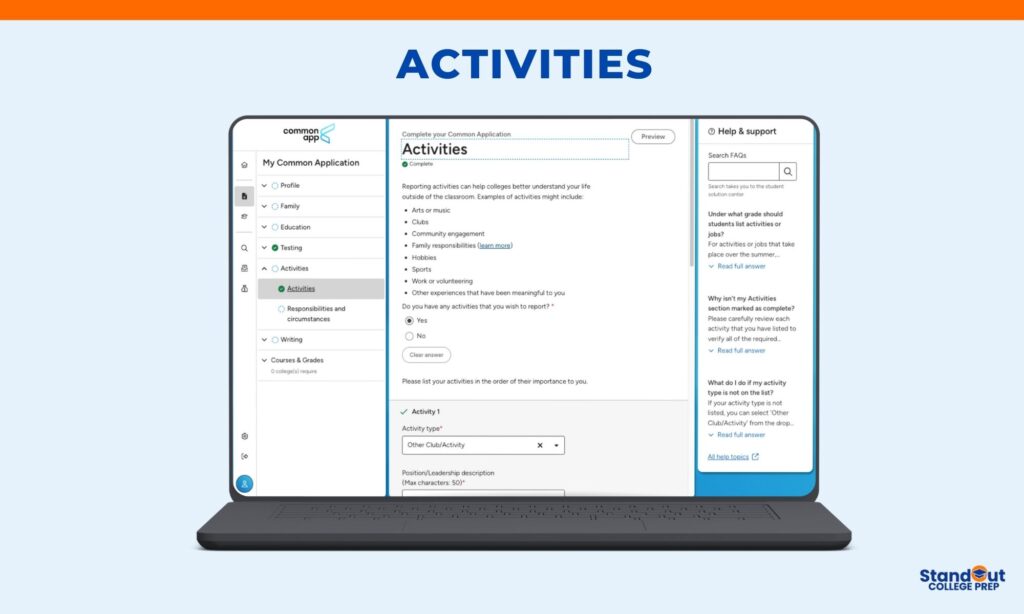
The Activities section is where you’ll report what you’ve done outside the classroom during high school. These Common App questions help colleges understand how you spend your time and how involved you’ll be on their campus.
Do You Have Activities to Report?
You’ll answer yes or no. If you answer yes, you can list up to 10 activities.
Most competitive applicants report activities, even if they’re just family responsibilities or part-time work. Quality matters more than quantity. Three meaningful activities with real involvement beat 10 clubs where you barely participated.
What Counts as an Activity?
An activity is anything you’ve done in or outside of school. The Common App activity categories include:
- Arts
- Athletics (Club)
- Athletics (JV/Varsity)
- Career-Oriented (Internships)
- Community Service (Volunteer)
- Computer/Technology
- Cultural
- Dance
- Debate/Speech
- Environmental
- Family Responsibilities
- Journalism/Publication
- Music (Instrumental)
- Music (Vocal)
- Research
- Science/Math
- Student Government/Politics
- Theater/Drama
- Work (Paid)
- Other Club/Activity
Examples include school clubs, sports teams, volunteer work, part-time jobs, family responsibilities like caring for siblings, independent projects, hobbies, internships, and research.
Can You Include Middle School Activities?
Generally, no, unless you started something in middle school and continued developing it through high school. Examples: competitive tennis since age 10, piano since age 8, or volunteering at the same organization since 7th grade. This shows sustained commitment.
Order Matters
List activities in order of importance to you, not chronological order. Put your most significant activity first, even if you started it in your junior year.
The Questions on the Common App for Each Activity
For each activity, you’ll answer:
- Activity Type: Select the category that best fits from the dropdown menu.
- Position/Leadership Description (50 characters): Your title and role. Be specific about leadership. Examples: “Founder & President, organized 12 fundraisers” or “Varsity Captain, led team to state finals.”
- Organization Name (100 characters): Don’t just write the organization name. Be descriptive. Examples: “Young Scholars Club at Longwood High School” or “Research Assistant, Memorial Sloan Kettering Cancer Center.”
- Description of Activity (150 characters): This is the most important field. Show what you accomplished with specific numbers and results. Write statements that start with “I” and end with concrete achievements. Use all 150 characters.
- Participation Grade Levels: Check all years you participated (9th, 10th, 11th, 12th, Post-graduate).
- Timing of Participation: Select During school year, During school break, or All year.
- Hours Spent Per Week: Round to the nearest whole number. If hours varied, estimate an average.
- Weeks Spent Per Year: Count carefully based on timing. School year activities are usually 30-38 weeks. Summer programs are typically 8-12 weeks. Year-round activities are 52 weeks.
- Intend to Participate in College: Answer yes or no honestly. Too many “no” answers suggests you weren’t genuinely engaged. Too many “yes” answers (across 10 activities) seems unrealistic.
How to Answer These Common App Questions
Show leadership, dedication, and impact. Use specific numbers whenever possible. Lead with strong action verbs like “organized,” “created,” “managed,” “led.”
Be honest about your involvement. Don’t inflate your role or hours. Admissions officers will spot inconsistencies with recommendation letters.
Use all available characters, especially in the 150-character activity description. Every character counts.
What If You Don’t Have Traditional Activities?
Working 25 hours a week to support your family is an activity. Caring for siblings after school is an activity. Teaching yourself to code is an activity. Helping run a family business is an activity.
Colleges want to see how you spend your time and what you value. Authenticity matters more than having a resume that looks like everyone else’s.
My Common Application: Writing
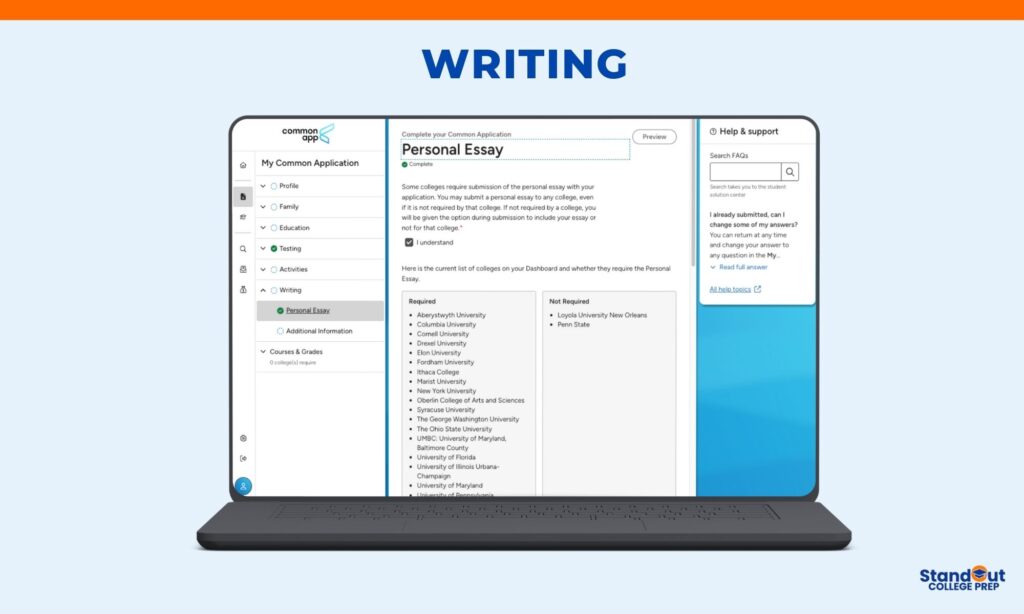
The Writing section of the Common App includes the essay questions that allow colleges to understand you beyond grades and test scores. These questions cover your Personal Essay and two optional Additional Information questions.
Common App Personal Essay (650 Words)
The Personal Essay is the main essay on the Common App. It is a 650-word essay that is sent to all of your colleges unless a school does not require it.
Before writing, you’ll confirm whether you want to include your Personal Essay in your application. The Common App will clearly show which colleges on your list require the essay and which do not.
You will then choose one of the seven Common App essay questions (prompts):
- Some students have a background, identity, interest, or talent that is so meaningful they believe their application would be incomplete without it. If this sounds like you, share your story.
- The lessons we take from obstacles we encounter can be fundamental to later success. Recount a challenge, setback, or failure. How did it affect you, and what did you learn?
- Reflect on a time when you questioned or challenged a belief or idea. What prompted your thinking, and what was the outcome?
- Reflect on something someone has done for you that made you happy or thankful in a surprising way. How has this gratitude affected or motivated you?
- Discuss an accomplishment, event, or realization that sparked a period of personal growth and a new understanding of yourself or others.
- Describe a topic, idea, or concept you find so engaging that it makes you lose track of time. Why does it captivate you? How do you learn more about it?
- Share an essay on any topic of your choice. It can be one you’ve already written, one that responds to a different prompt, or one of your own design.
Your essay must be between 250 and 650 words, and most students write close to the full word limit.
How to Write and Submit Your Common App Essay
Always write your essay outside of the Common App first, using Google Docs or Microsoft Word. This allows you to revise, save versions, and share drafts for feedback.
When your essay is final, copy and paste it into the Common App text box. You may also upload your essay as a Word document, PDF, or directly from Google Drive.
Before submitting, proofread carefully. Check for formatting problems such as extra spaces or line breaks that sometimes appear when pasting text.
For step-by-step guidance on answering the Common App essay questions, you can download my college essay packet, which includes examples and structured prompts to help you get started.
Additional Information: Two Optional Common App Questions
The Additional Information section includes two separate Common App essay questions. Both are optional, and each serves a different purpose.
Question 1: Challenges or Circumstances (Up to 250 Words)
This question asks whether you would like to explain challenges or circumstances that affected your academic performance or achievements during high school.
You’ll first answer yes or no. If you select yes, a text box appears where you can write up to 250 words.
The Common App provides examples such as:
- Limited access to technology or a quiet study space
- Community disruption (violence, protests, teacher strikes)
- Discrimination
- Family disruptions (divorce, illness, job loss, incarceration, death)
- Caregiving or financial obligations
- Housing instability or homelessness
- Physical health or mental well-being challenges
- Natural disasters or conflict
When to use this question:
Use it if circumstances beyond your control directly impacted your grades, course rigor, test scores, or extracurricular involvement.
How to write your response:
Be factual and concise. Explain what happened, when it occurred, and how it affected your academics or activities. Avoid excuses or emotional language. Admissions officers are looking for context, not dramatization.
Question 2: Additional Details or Qualifications (Up to 300 Words)
This separate question asks whether you would like to share additional information not reflected elsewhere in your application.
If you answer yes, you’ll have up to 300 words.
Appropriate uses include:
- Additional activities beyond your top 10
- Extra honors or awards
- Links to portfolios, websites, GitHub, or creative work
- Explanation of unusual academic situations
- Context about limited school offerings
- Certifications, publications, or independent projects
What not to include:
- A second personal essay
- Repeated information from other sections
- Long explanations of interest in specific colleges
Use this space only if you have meaningful information that genuinely adds context. If you don’t, it’s okay to leave it blank.
Final Word: Common App Essay Questions
The Writing section contains multiple essay questions on the Common App, each with a specific purpose. The Personal Essay tells your story. The Additional Information questions provide context or fill gaps. Used thoughtfully, these sections help admissions officers see the full picture of who you are.
My Common Application: Courses and Grades
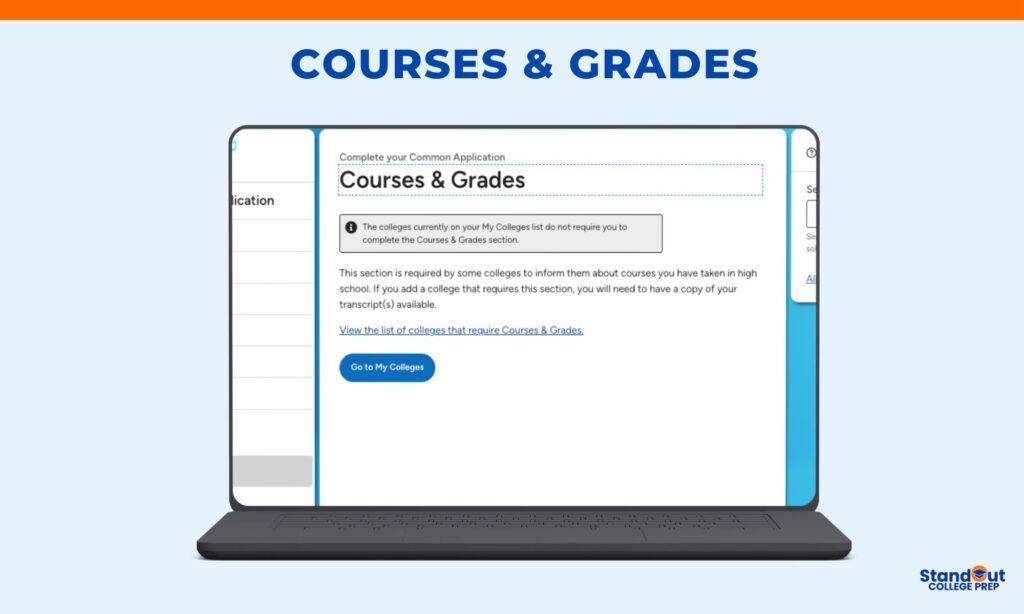
The Courses & Grades section is optional and only required by some colleges. Whether you need to complete this section depends on which colleges are on your “My Colleges” list.
Do You Need to Complete This Section?
The Common App will tell you if any colleges on your list require Courses & Grades. You’ll see a notification at the top of the section that says either:
- “The colleges currently on your My Colleges list do not require you to complete the Courses & Grades section” (you can skip it), or
- “X college(s) require you to complete the Courses & Grades section” (you need to fill it out)
You can view the list of colleges that require Courses & Grades by clicking the link in this section.
What Is This Section For?
If required, this section asks you to self-report all your high school courses and grades from 9th through 12th grade. You’ll enter course names, grade levels, and the grades you received.
This is basically a self-reported transcript. Colleges that require this section want to see your academic record before you send official transcripts.
What You’ll Need
If you need to complete Courses & Grades, have a copy of your high school transcript ready. You’ll enter information exactly as it appears on your transcript, including:
- Course titles
- Grade level for each course
- Grades received (by semester or trimester, depending on your school’s system)
- Credits earned
- Course level (AP, IB, Honors, Regular, etc.)
Important Notes
Even if you self-report your courses and grades here, you’ll still need to send official transcripts to colleges. This section doesn’t replace official transcripts.
Not all colleges require this section. Many schools prefer to wait for your official transcript instead of having you self-report.
If none of your colleges require it, skip this section entirely. Don’t waste time filling it out if it’s not needed.
My Colleges Tab
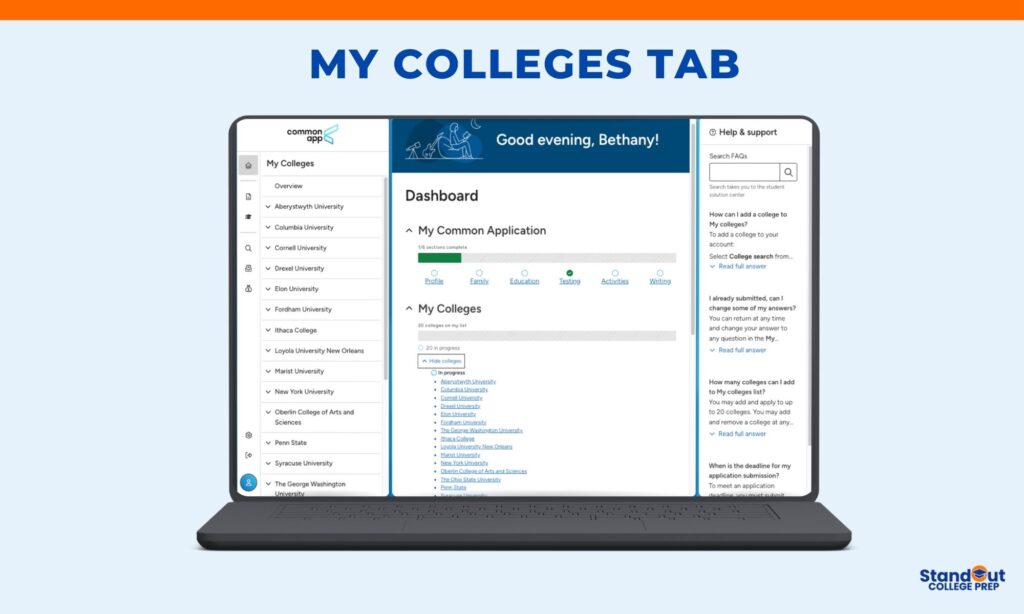
After you add colleges to your list from the College Search tab, they’ll appear in the My Colleges tab. This is where you’ll manage applications, track requirements, and submit to each school.
What You’ll See in My Colleges
The My Colleges tab shows every college on your application list. For each college, you’ll see:
Overview: A quick snapshot of your application status for that school.
College Information: Contact details, application deadlines, links to the college website, admissions office, financial aid office, and virtual tours. Many colleges also link to their social media accounts.
Application Sections: These track your progress through different parts of the application:
- General (college-specific questions)
- Academics (courses and grades, if required)
- Writing (supplemental essays, if required)
- Recommenders and FERPA
- Review and Submit Application
Each section shows if it’s complete, in progress, or not started.
Application Requirements by College
Every college has different requirements. The My Colleges tab shows you exactly what each school needs. Here’s what you’ll find for each college:
Application Deadlines
You’ll see the admission plan and deadline for each college. Examples:
- Early Decision: November 1
- Early Action: November 15
- Regular Decision: January 15
- Rolling Admission: July 28
Make sure you know which deadline applies to the admission plan you selected.
Application Fees
Most colleges charge an application fee. You’ll see both domestic and international fees listed. Examples:
- First Year Domestic Fee: $0 (no fee for US students)
- First Year International Fee: $20
If you requested a Common App fee waiver and it was approved, fees will be waived at participating colleges.
Standardized Test Policy
Each college lists its testing policy. Common policies include:
Test Required: You must submit SAT or ACT scores.
Test Optional: Submitting scores is optional. You decide whether to send them.
Test Flexible: The college accepts various types of standardized tests (SAT, ACT, AP, IB, etc.).
Test Blind: The college does not consider standardized test scores at all.
Always click “Test Policy Information” or “See website” to understand the specific policy for each college. Test-optional doesn’t always mean what you think it means at every school.
English Proficiency Tests
For international students, colleges will list accepted English proficiency tests like TOEFL, IELTS, Duolingo English Test, or PTE Academic. If you’re an international student, click “See website” to find minimum score requirements.
Courses & Grades
This shows whether the college requires you to self-report your courses and grades in the Courses & Grades section. You’ll see:
- Required: You must complete this section
- Not Used: Skip this section for this college
Recommendations
This lists exactly what recommendation letters and school forms each college requires. Examples:
School Report: Required (your counselor submits this)
Counselor Recommendation: Required
Teacher Evaluation(s): 2 Required, 1 Optional (or “Not Applicable” if not needed)
Other Evaluation(s): Could be from coaches, employers, mentors, etc.
Final Report: Required (your counselor submits this after you graduate)
Pay close attention to these requirements. Some colleges want 2 teacher recommendations, others want 1, some want none.
Writing Requirements
You’ll see two types of writing requirements:
Common App Personal Essay: Required or Not Required. Most colleges require the 650-word Common App essay. A few don’t.
College Questions: These are supplemental questions specific to each college. You might see “1 Required Question,” “3 Required Questions,” or “No additional questions.”
Writing Supplement: Some colleges require additional supplemental essays beyond their questions. This section will tell you if there are extra essays and provide word counts.
Click into each college’s Writing section to see the actual essay prompts and questions.
Additional Information
Some colleges include special policies or notes about their application process. Examples:
- “We operate an inclusive admissions policy and consider applications holistically”
- “UK applicants should apply via UCAS, not the Common App”
- Information about how they review applications
Read this section carefully for each college. It often contains important details about what they’re looking for or exceptions to their policies.
How to Use the My Colleges Tab
Check requirements for each college before you start applying. Don’t assume all colleges need the same things.
Track your progress. The application sections show what’s complete and what still needs work.
Apply to colleges one at a time. Click into a college, complete all required sections, review, and submit. Then move to the next college.
Double-check deadlines. Missing a deadline by even one day can mean your application won’t be considered.
Review application fees. Plan for these costs or make sure your fee waiver is in place.
Read college-specific notes. The additional information section often contains crucial details.
Important Reminders
You can add up to 20 colleges to your My Colleges list. You can also remove colleges if you change your mind.
Each college sees only the application you submit to them. They don’t see what other schools you’re applying to or what you wrote in other schools’ supplemental essays.
You must submit to each college separately. Completing your Common App doesn’t automatically send it to all schools. You review and submit to each college individually.
Some colleges have different deadlines for different admission plans. Make sure you selected the right plan and know the corresponding deadline.
Direct Admissions
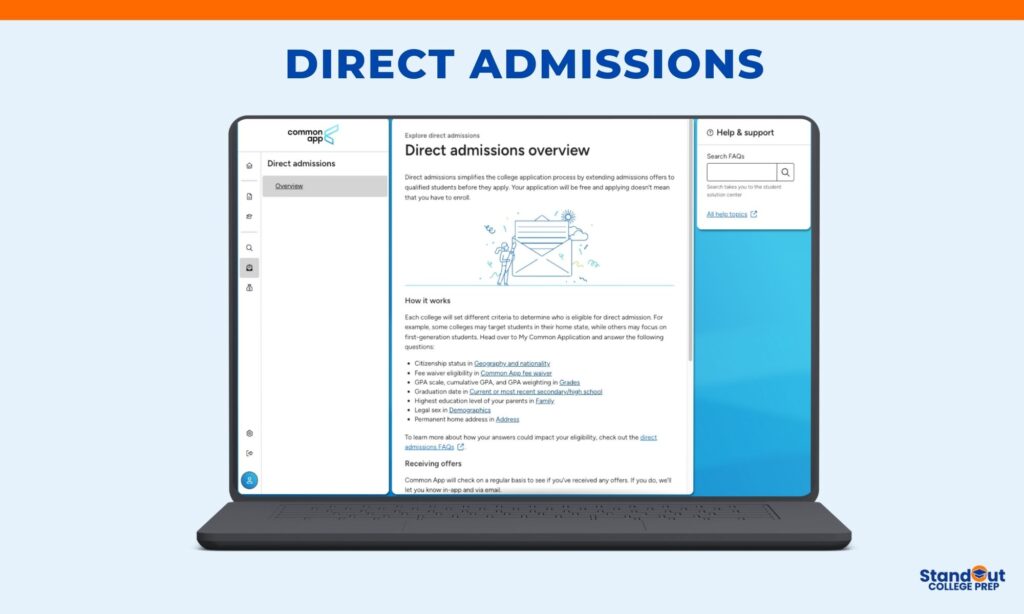
Direct Admissions is a feature that can simplify the college application process. Some colleges extend admissions offers to qualified students before they even apply. If you receive an offer, your application to that college is free, and accepting the offer doesn’t obligate you to enroll.
How Direct Admissions Works
Each college sets its own eligibility criteria. Some colleges target students in their home state. Others focus on first-generation students, students with certain GPA ranges, or other specific criteria.
To be considered for direct admissions offers, you need to complete certain sections of your Common App profile:
- Citizenship status in Geography and Nationality (Profile section)
- Fee waiver eligibility in Common App Fee Waiver (Profile section)
- GPA scale, cumulative GPA, and GPA weighting in Grades (Education section)
- Graduation date in Current or Most Recent Secondary School (Education section)
- Highest education level of your parents in Family section
- Legal sex in Demographics (Profile section)
- Permanent home address in Address (Profile section)
Once you complete these sections, the Common App automatically checks if you qualify for any direct admissions offers from participating colleges.
Receiving Offers
The Common App checks regularly to see if you’ve received any direct admissions offers. If you do, you’ll be notified both in the app and via email.
The offers will appear on your Direct Admissions page, where you can review which colleges have extended offers to you.
What If You Don’t Receive Offers?
Not receiving a direct admissions offer doesn’t mean you shouldn’t apply to a college. Many academically qualified students don’t receive direct admissions offers simply because they don’t meet the specific criteria a college is using for that particular program.
If you love a college and want to apply, apply. Direct admissions is just one pathway. The regular application process is still available to everyone.
Accepting an Offer
Direct admissions offers are non-binding. You can accept the offer now and decide later whether you want to enroll.
To accept a direct admissions offer:
- Find the college on your Direct Admissions offers page
- Add the college to your My Colleges list
- Complete and submit your application before their latest deadline
Even though you received a direct admissions offer, you still need to submit a complete application. The offer means you’re already admitted, but the college still needs your full application materials to finalize your file.
Benefits of Direct Admissions
Free application: Colleges waive application fees for direct admissions students.
Less stress: You already know you’re admitted before you complete the full application.
More options: You might discover colleges you hadn’t considered before.
No commitment: Accepting an offer doesn’t obligate you to enroll. You can still apply to other colleges and compare offers before making a final decision.
Important Notes
Direct admissions doesn’t replace financial aid applications. You’ll still need to complete the FAFSA and CSS Profile (if required) to receive financial aid offers.
Complete your Common App profile early. The sooner you fill out those key sections, the sooner you can start receiving direct admissions offers.
Check your email regularly. The Common App will notify you if you receive offers, but you need to check your email to see them.
Financial Aid
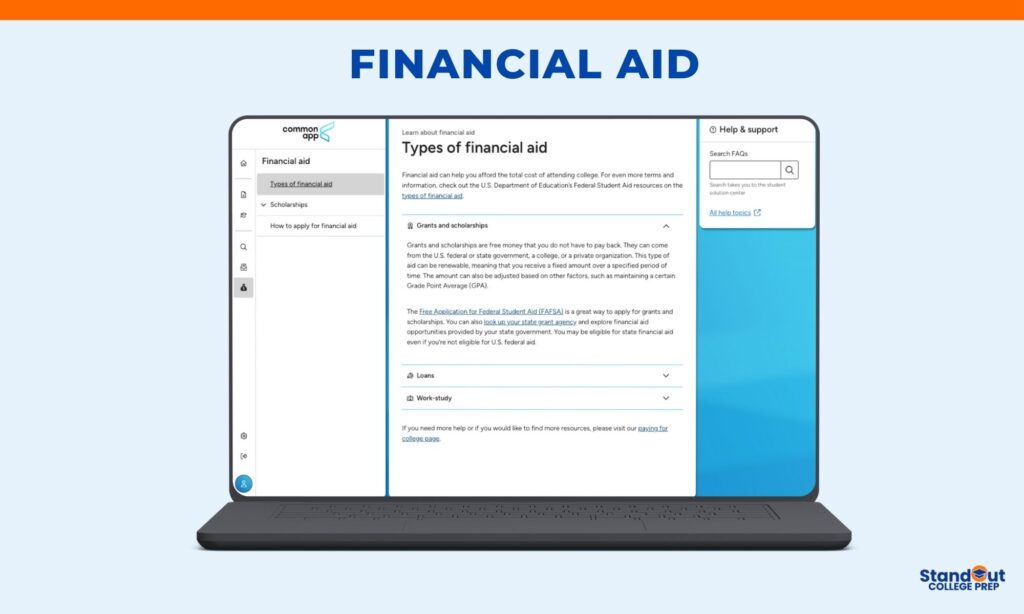
The Financial Aid tab in the Common App provides information about paying for college. This section explains different types of financial aid and how to apply for it.
Types of Financial Aid
Financial aid helps you afford the total cost of attending college. There are three main types of financial aid:
Grants and Scholarships
Grants and scholarships are free money that you do not have to pay back. This is the best type of financial aid because it reduces your out-of-pocket costs without creating debt.
Grants and scholarships can come from:
- The U.S. federal government (like Pell Grants)
- State governments (each state has its own grant programs)
- Colleges themselves (institutional aid based on merit or need)
- Private organizations (corporations, nonprofits, community groups)
Most grants and scholarships are renewable, meaning you receive a fixed amount over a specified period of time (usually four years). The amount can be adjusted based on factors like maintaining a certain Grade Point Average (GPA) or continued financial need.
To apply for federal grants and scholarships, complete the Free Application for Federal Student Aid (FAFSA). This is the main form that determines your eligibility for federal financial aid.
You should also look up your state grant agency to explore financial aid opportunities provided by your state government. You may be eligible for state financial aid even if you’re not eligible for U.S. federal aid.
Loans
Loans are money you borrow to pay for college that you must pay back with interest. The Common App provides information about different types of student loans, including federal student loans and private loans.
Federal student loans typically have lower interest rates and more flexible repayment options than private loans.
Work-Study
Work-study programs allow you to work part-time while in college to help pay for education expenses. Federal work-study is awarded through the FAFSA based on financial need.
Scholarships
The Common App has a separate Scholarships section where you can search for scholarship opportunities. Many scholarships have specific eligibility requirements based on academic achievement, intended major, background, location, or other criteria.
How to Apply for Financial Aid
This section provides step-by-step guidance on applying for financial aid, including when to complete the FAFSA, what documents you’ll need, and deadlines to watch for.
For more detailed information about paying for college, visit the Common App’s paying for college page.
Important Reminders
Complete the FAFSA as soon as possible after October 1 of your senior year. Some aid is awarded on a first-come, first-served basis.
Apply for scholarships early and often. There are thousands of scholarships available, and many go unclaimed because students don’t apply.
Check each college’s financial aid requirements. Some colleges require the CSS Profile in addition to the FAFSA.
Don’t assume you won’t qualify for aid. Always complete the FAFSA, even if you think your family earns too much. You might be surprised.
Common App: Frequently Asked Questions
Here are quick answers to the most common questions students have about the Common App. For more detailed help on any of these topics, check out the linked resources or download my college application guides.
Choose a prompt that lets you tell a story only you can tell. Don’t overthink which prompt is “best.” Focus on what you want admissions officers to know about you that isn’t obvious from the rest of your application. For step-by-step help and sample essays, download my essay packet.
The School Report and Counselor Recommendation are required parts of the Common App that provide admissions officers with context beyond your grades and test scores.
The School Report includes your official high school transcript and information about your school itself, such as class size, course offerings, grading scale, and academic rigor. This helps colleges understand how to interpret your grades within the context of what was available to you.
The Counselor Recommendation is a letter written by your school counselor that explains who you are as a student and member of your school community. It typically addresses your academic performance, work ethic, character, and any meaningful contributions or leadership roles.
You do not submit either of these documents yourself. Both the School Report and the Counselor Recommendation are uploaded directly by your school counselor through the Common App.
Together, these materials help colleges evaluate your academic record fairly and understand your personal and educational journey within the context of your high school.
Submitting letters of recommendation through the Common App is straightforward, but it does require advance planning.
You request recommendations in the Recommenders and FERPA section of the Common App. After you enter your recommender’s email address (typically a teacher or mentor), the Common App automatically sends them instructions for uploading their letter.
Once a recommender agrees, you can track the submission status directly in your application. You’ll see whether each letter has been submitted, is in progress, or is still pending.
Because strong letters take time to write, you should give recommenders at least 3–4 weeks’ notice before your earliest application deadline. Letters of recommendation add an important personal perspective to your application by highlighting your academic abilities, character, and contributions beyond grades and test scores.
The Recommenders and FERPA section of the Common App is where you manage letters of recommendation, grant permissions, and invite adults to support your application.
This section has two main parts.
First, you will complete the FERPA release, which asks whether you waive your right to view your letters of recommendation. You should always waive this right. Colleges place significantly more trust in recommendations when students waive access.
Second, you will invite your school counselor and teachers to submit recommendations by entering their email addresses. The Common App automatically sends them instructions for uploading their materials. For each college on your list, you can see how many recommendations are required and whether any are optional.
This section is also where you can add an advisor (such as a college counselor or consultant) to review your application. Adding an advisor allows them to see your Common App materials and help you catch errors or make improvements, but they cannot submit anything on your behalf.
Throughout the process, you can monitor whether your counselor and teachers have submitted their recommendations and track deadlines to ensure everything is completed on time.
Before submitting your Common App to any college, take time to carefully preview your entire application. Use the Preview button to see exactly what admissions officers will see, including your personal information, activities, essays, and attached documents.
As you review, check for:
Typos or formatting issues
Missing answers or incomplete sections
Correct essays assigned to each college
Once you click Submit for a specific college, you cannot make changes to that application. However, you can continue editing your Common App for colleges you have not yet submitted to.
Be sure to submit each application well before the college’s deadline. After submission, you’ll receive a confirmation email, and you can track the status of your application through the Common App dashboard.
Both the Common App and the Coalition App allow students to apply to multiple colleges using one main application, but there are important differences between the two.
The Common App is accepted by over 900 colleges and universities, making it the most widely used application platform. It offers a straightforward interface and is the primary application system for most U.S. colleges.
The Coalition App is accepted by about 150 colleges, many of which also accept the Common App. One distinctive feature of the Coalition App is the Locker, a digital space where students can store documents, essays, awards, and academic work over time. The platform is designed to emphasize a student’s growth throughout high school.
Both applications require similar materials, such as personal information, essays, transcripts, and recommendations, though individual college requirements may vary slightly depending on the platform.
Because significantly more colleges accept the Common App, most students use the Common App. If a college accepts both applications, you can choose whichever platform you prefer—there is no admissions advantage to using one over the other.
If you make a mistake on your Common App, don’t panic. What you can do depends on when you catch the error and how serious it is.
If you have not submitted your application yet, simply go back to the relevant section and fix the mistake before submitting.
If you have already submitted to a college, you cannot edit that application. However, minor errors—such as small typos or formatting issues—are not a big concern. Admissions officers are not looking for perfection, and these kinds of mistakes rarely affect decisions.
If the error is significant, such as incorrect test scores, missing information, or an inaccurate course listing, you should email the college’s admissions office directly. Be honest and concise. Include your full name, Common App ID, and a clear explanation of the correction needed. In some cases, the college may allow you to submit an addendum or note the correction in your file.
Admissions officers appreciate students who take responsibility and communicate clearly. Addressing a meaningful mistake promptly and professionally is always better than ignoring it.
Tracking your application statuses and deadlines is essential to making sure your materials are received on time and your applications are complete.
The Common App dashboard allows you to monitor the status of each college on your list, including whether required materials—such as recommendations and transcripts—have been submitted. You should check the dashboard regularly to confirm that nothing is missing.
Each college sets its own application deadlines, which may differ even if you’re applying through the Common App. Use the dashboard to stay organized and set personal reminders so you don’t miss important dates, including recommendation deadlines and submission cutoffs.
After you submit an application, watch your email carefully. Most colleges will send you login credentials for an applicant portal, where you can track application status, confirm receipt of materials, view missing items, and eventually see your admission decision.
To stay fully organized, keep a spreadsheet with:
Application deadlines
Submission dates
Applicant portal logins
Notes on missing materials
You can also download the My College Tracker spreadsheet to keep everything in one place and reduce last-minute stress.
Once you submit your Common App to a college, you cannot edit that application. Any updates must be handled directly with the individual college.
If you receive important new information after submitting—such as improved grades, new awards, updated test scores, or a significant achievement—you may be able to send an update to the admissions office. Many colleges allow applicants to submit updates by email or through their applicant portal, but policies vary by school.
Before sending anything, check each college’s admissions website or applicant portal for instructions on submitting additional information. Only send updates that are meaningful and relevant. Sending frequent or minor updates can work against you rather than help.
Not all colleges accept post-submission updates, so always follow the school’s specific guidelines. When updates are appropriate, keep your communication brief, professional, and focused on information that genuinely strengthens your application.
If you run into technical or application-related issues while using the Common App, don’t panic. Most problems are common and fixable.
If you experience technical issues such as pages not loading, error messages, or trouble saving or uploading documents, try these steps first:
Clear your browser cache
Log out and log back in
Switch to a different browser (Chrome tends to work best)
If the issue continues, visit the Common App Help Center, which includes troubleshooting guides and answers to frequently asked questions. You can also contact Common App support directly through the Help & Support section in your account.
For questions about application requirements or what information to include, check the Help Center or ask your school counselor for guidance.
Address technical problems as soon as they arise. Waiting until the last minute can increase stress and risk missing a deadline if an issue takes longer than expected to resolve.